
Who needs a paid seat in GemFit for Coaches?
Coaches and staff on your side use seats. Clients you invite are free, and they accept the sharing request in GemFit on their iPhone.
GemFit for Coaches
Review client check-ins and assign plans through a consent-based coach workspace.
For independent fitness coaches and small coaching teams.
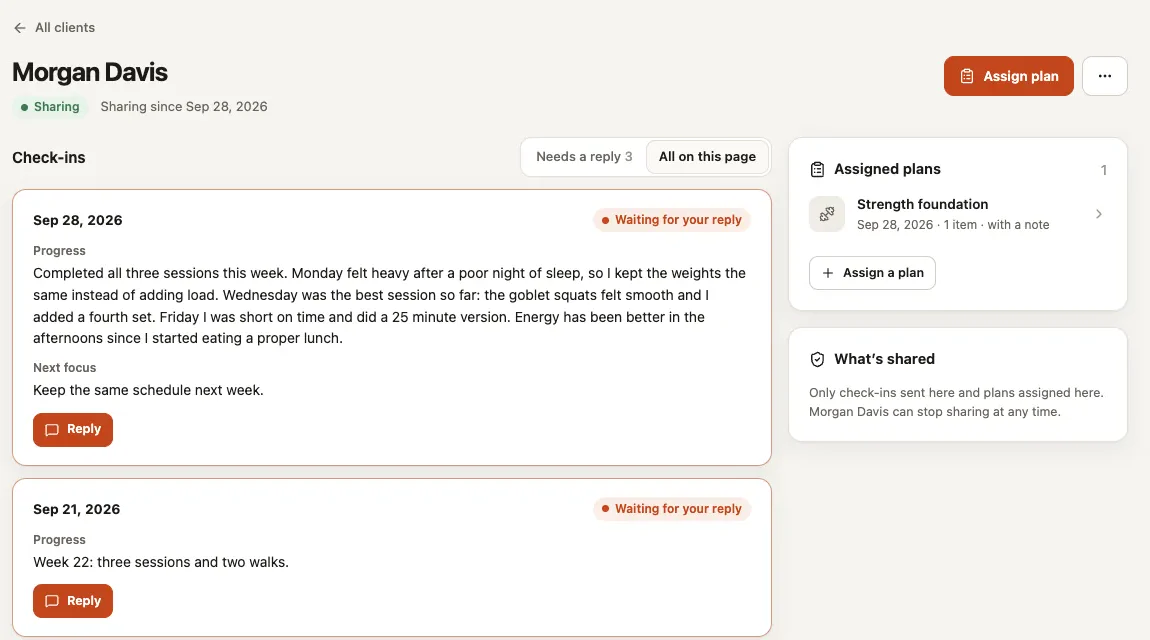
A coach needs the information a client chose to share, alongside the plan they are following. Keep the coaching relationship and shared check-ins explicit.
Invite the client and let them accept the sharing request.
Assign a plan and collect check-ins in the coaching workspace.
Review progress and update the next plan with a saved assignment record.
Maya accepts your invitation in GemFit and chooses to share. You assign version 3 of her strength plan and it becomes active in her app. Her check-ins arrive in your coaching workspace, and you update the next plan from there. Sam has not accepted yet, so all you see is that the invitation is waiting. If Maya stops sharing, your access ends immediately.
Names and dates are sample data from the screen above.
Client consent governs access. Joining a coaching workspace does not give staff blanket access to a person’s food log, body measurements or private journal. Clients need GemFit 1.0.11 or later on iPhone to use the sharing controls. This is a coaching tool, not a medical service.
One subscription for this product, billed monthly. Every extra seat costs less, and invited customers and vendors are free.
Pay only for your own staff. Customers, clients and vendors you invite are free guests and never use a seat.
That is $9.20 a seat on average, $4 less than paying $10 for every seat.
| Seats | Each, per month |
|---|---|
| First seat | $10 |
| Seats 2 to 5 | $9 |
| Seats 6 to 10 | $8 |
| Seats 11 to 25 | $7 |
| Seat 26 and up | $6 |
Coaches and staff on your side use seats. Clients you invite are free, and they accept the sharing request in GemFit on their iPhone.
No. You see what the client chose to share. Joining a coaching workspace does not give staff blanket access to a food log, body measurements or a private journal.
Yes, in supported workspaces. Ask in plain words and the assistant prepares the change. You see exactly what will change and approve it first, and your normal permissions still apply. Each plan includes an AI allowance; everything still works by hand when it runs out.
No. Every product except Website Follow-up works on its own. Website Follow-up comes included with a published SYSTALOG website.
Request a scoped buyout quote. The quote defines the software, license and handoff. Ongoing hosting, provider usage and support are separate; a buyout does not promise unlimited services forever.
Create an account, choose your staff seats and invite your team. Customers and vendors you invite never use a seat.