SYSTALOG.ai

BlackBox app iconBlackBoxPersonal surveillance for iPhone

A private timeline of your day, kept on your iPhone.

BlackBox is for keeping your own record of where you were and what happened. It records where your iPhone goes and keeps the notes, photos and files you add. Your timeline stays on your phone, with no account, until you choose to share it.

  • Free 24-hour preview, never charges you
  • $3.99 a month if you subscribe
  • No account, no ads
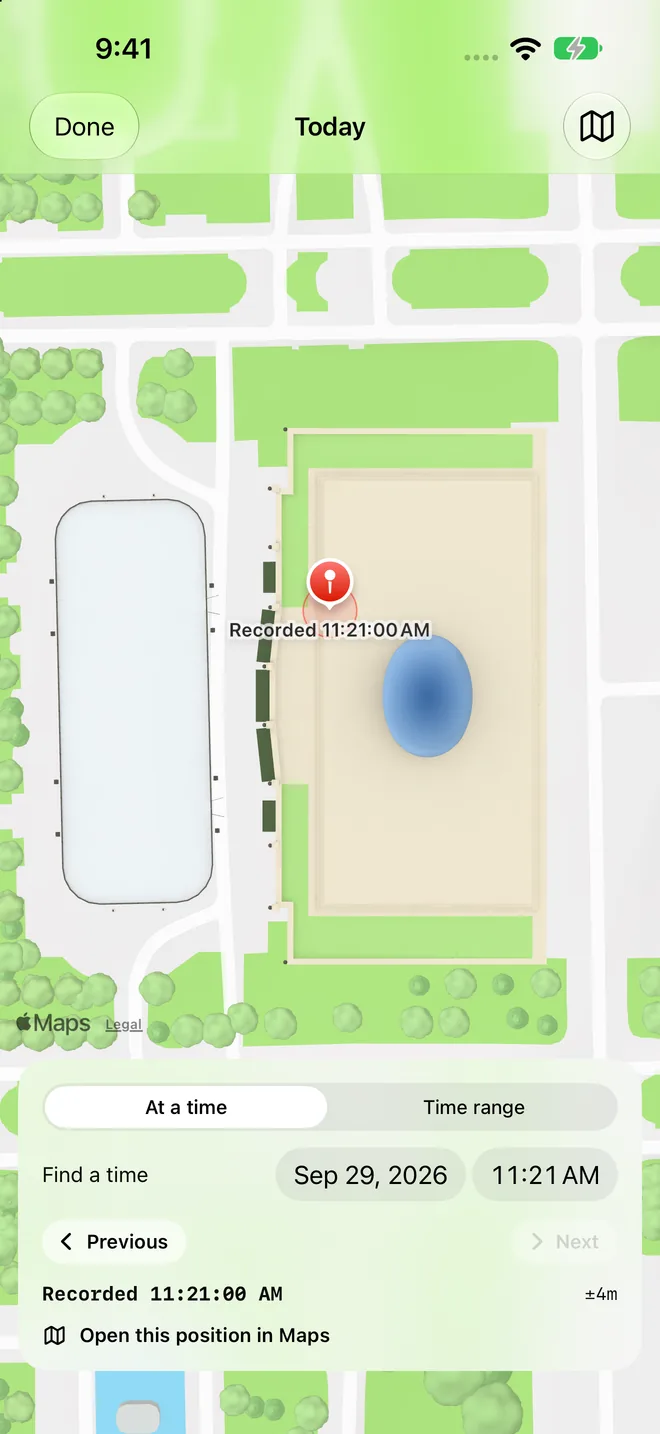
BlackBox map screen: a recorded position at 11:21 AM with its accuracy, and controls to find a time or time range.
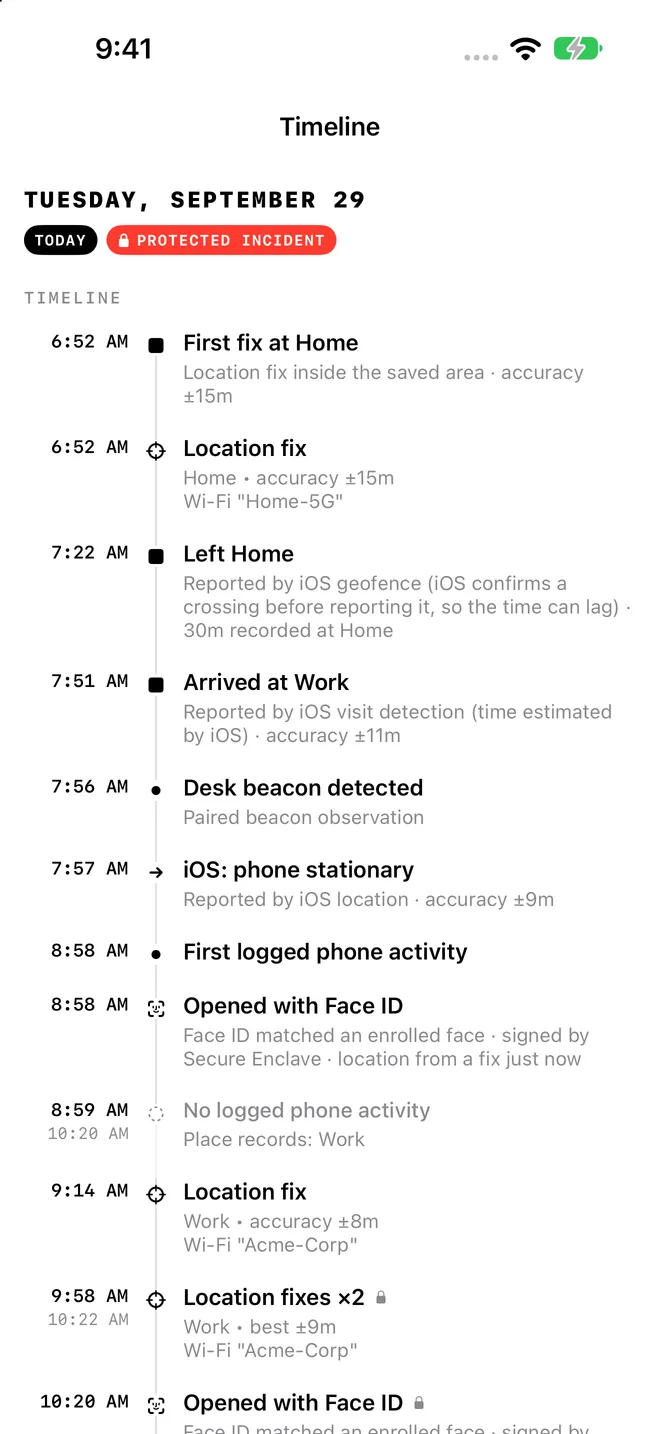
BlackBox Timeline screen for Tuesday, September 29: first fix at home, left home, arrived at work, each with a time and location accuracy.

Made for keeping your own record

BlackBox is for adults recording their own iPhone. It isn't for tracking or recording other people.

  • You want to remember your dayWhere you went and when, without keeping a diary by hand.
  • Something happened and the details matterMark it right away, write down what happened, and keep the photos and files with it.
  • You may need to explain it laterLook up a recorded time, then share an export with the original files when you decide.

How it works

A record of your day you can check

With your permission, BlackBox records in the background. Every entry shows where it came from and how accurate it is, so you know what your record says and what it doesn't.

Your day as a timeline

Arrivals, departures and location fixes reported by iOS, in order, with the time and accuracy of each. If iOS didn't report anything, BlackBox shows a gap instead of guessing.

  • When the reading was recorded
  • Where it came from, like an iOS visit or a saved place
  • How accurate it was, like ±15 m
Timeline entries with times, places and location accuracy such as plus or minus 15 meters.

Find where your phone was

Pick a date and time, or a range, and step through recorded positions. Open any point in Apple Maps.

Map with a recorded position and a Find a time control set to September 29, 11:21 AM.

Mark an incident while it's fresh

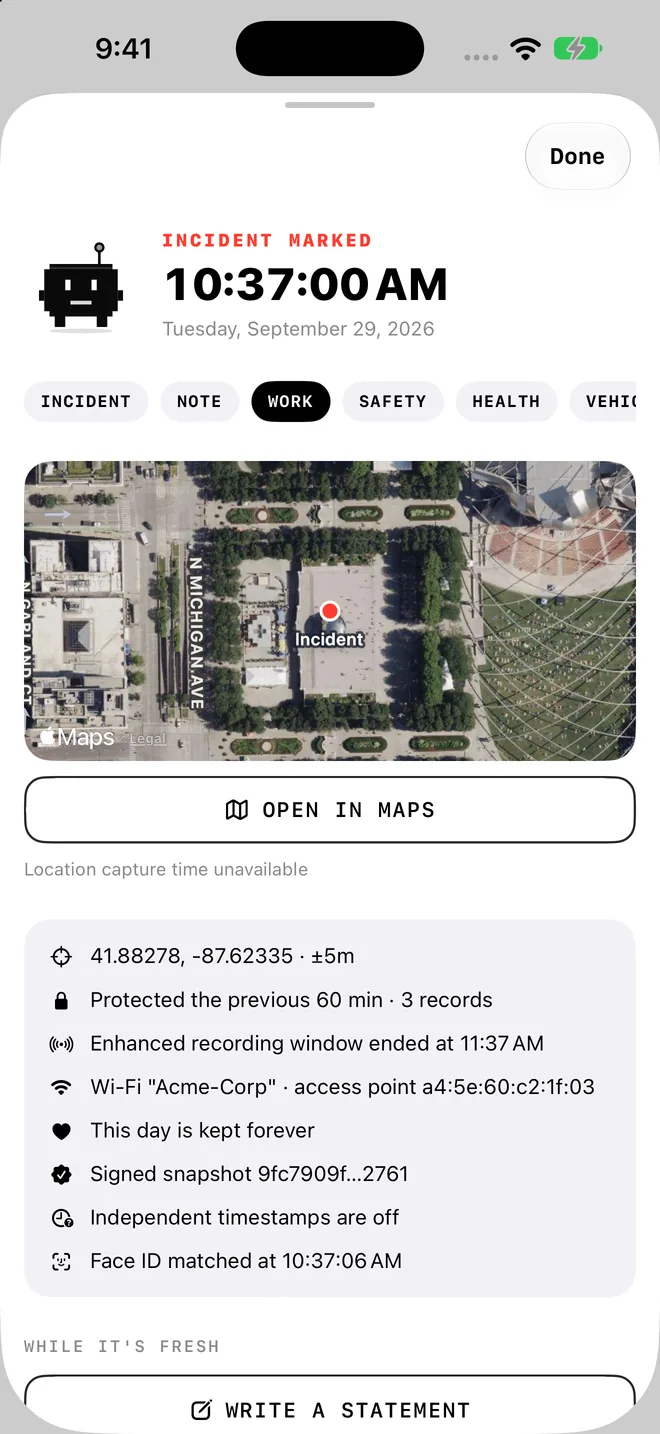
Marking an incident protects the records around it and asks for a fresh location. Then write a statement, attach photos or files, or start an audio recording yourself.

Incident marked at 10:37 AM with a map, coordinates, protected records and a signed snapshot.

Take your record with you

Create an export on your iPhone when you need it. It includes your original files and an inventory that says what's included, missing or deleted. Hash chains and signatures help show whether a record changed later.

  • PDFReadable reportYour timeline, incidents and notesIncluded
  • CSVRecords as CSV and JSONEvery entry with its source and accuracyIncluded
  • Coordinates and map linksRecorded positions you can open in MapsIncluded
  • Original photos, audio and filesByte-for-byte copies of what you savedIncluded
  • InventoryAnything missing or deleted is listed, not hiddenGaps noted

Optional photo check-ins

Off until you turn it on. After you unlock BlackBox with Face ID or Touch ID, it offers to take one rear-camera photo and asks first every time. Unlocking your iPhone itself never triggers a photo.

Private App Activity

See hourly Screen Time totals for apps you pick, to help manage your own phone use. It stays inside Apple's report, apart from your timeline and exports, and it doesn't log exact app open and close times.

Privacy

Your timeline lives on your iPhone, not on our servers

We built BlackBox so we never see your records. There's no BlackBox account and no server holding your timeline. We don't sell data or use your records to train AI.

Stays on your iPhone

  • Your timeline and recorded locations
  • Incidents, statements and notes
  • Photos, audio and files you add
  • App Activity, inside Apple's Screen Time report

Leaves when you choose

  • Exports and backups, sent where you pick
  • Address and independent timestamp lookups, both off for new installs
  • Map areas you view, loaded from Apple Maps

Never sent to us

  • No BlackBox account or timeline server
  • No ads and no third-party analytics SDK
  • No timeline, photos, locations or Screen Time in billing records. Apple handles payment.

What BlackBox can't do

We'd rather tell you now than have you find out when it matters.

  • It can't record everything. iOS decides when apps run, and permissions, battery and signal create gaps.
  • It can't show who was carrying the phone. It records the device, not the person.
  • It doesn't watch the rest of your phone. No exact app open times, and no photos when you unlock your iPhone.
  • It can't promise an alibi. A record can help you remember and explain, but no app can guarantee a legal outcome.

Read the BlackBox privacy policy

Pricing

Try it free for 24 hours. Keep it for $3.99 a month.

Start the preview when you're ready. It never charges you and never turns into a subscription by itself. If you want to keep recording, you subscribe separately.

BlackBox monthly
$3.99/ month
Coming soon to the App Store Get it on the App Store
  1. NOW
    Recording startsEverything is included for 24 hours: background location, incidents and optional photo check-ins.
  2. 23H
    A reminderA notification one hour before the preview ends, if you allow notifications.
  3. 24H
    Recording pausesNothing is charged. Subscribe to keep recording. Everything you recorded stays viewable, exportable and deletable.
  • Subscribing is a separate Apple purchase. If you subscribe during the preview, payment starts right away.
  • Renews monthly until you cancel in your Apple subscription settings. Apple shows the price before you buy.
  • App Activity stays free. For iPhone, in the United States at launch.
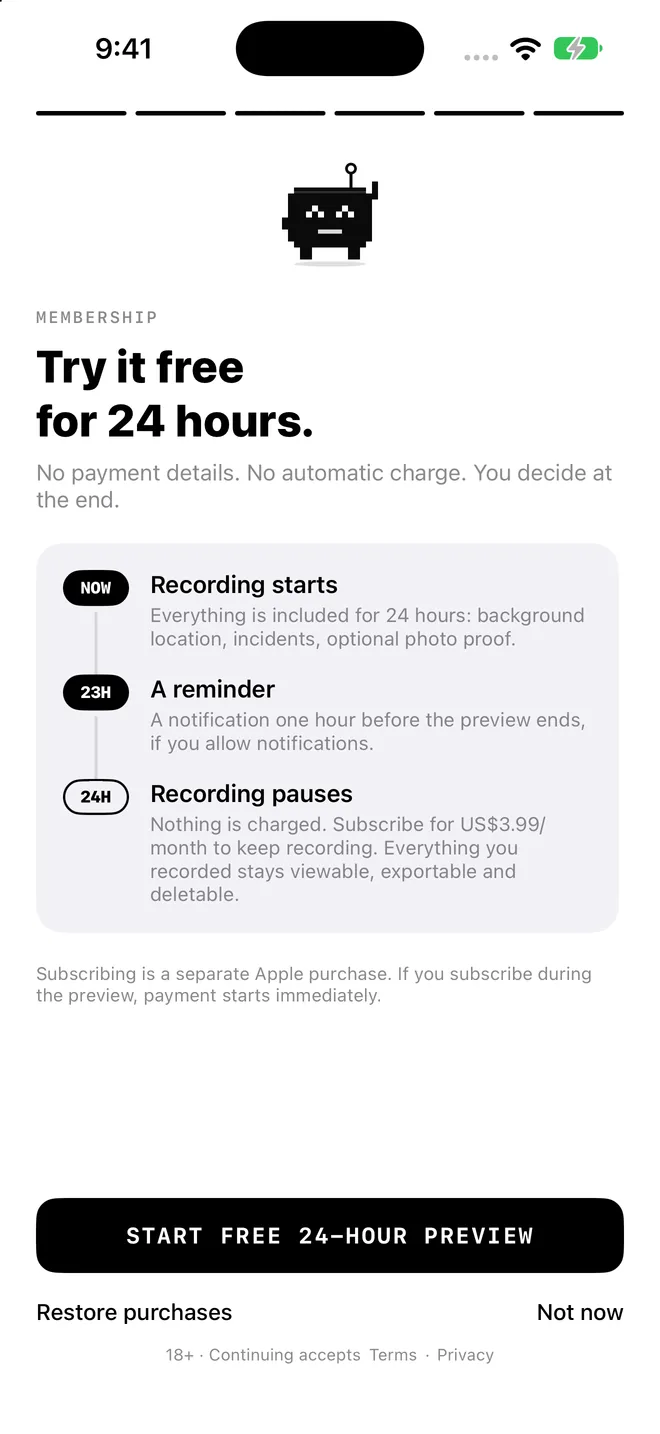
BlackBox onboarding screen: Try it free for 24 hours. No payment details. No automatic charge. You decide at the end.
The preview screen in the app

Questions

A private timeline for when the details matter

Straight answers about what BlackBox records, who can see it, and where its limits are.

Is there an app that can track my day for personal integrity?

BlackBox is a personal surveillance app for your own iPhone. With your permission, it records reported locations in the background and lets you keep incident details, notes and selected photos or files. You can look up a recorded time and keep your own account of important moments.

Can keeping records help if someone makes a false claim about me?

Your own dated records can help you rebuild the order of events and compare a claim with what was recorded. BlackBox exports the original files, recorded coordinates, map links and an inventory of what is included, missing or deleted. Device observations and your own notes are labeled separately. You decide when to share an export.

Does BlackBox track everything I do all day?

No. It records what iOS and your permissions allow while recording is on. It can't see every action or tell who was holding the phone. Private App Activity shows hourly Screen Time totals for apps you choose, not exact app opening and closing times. A gap stays a gap. BlackBox doesn't invent a position or fill in an event.

Can it guarantee an alibi or prove a slander or defamation claim false?

No. A personal record may keep useful context, but BlackBox can't decide whether an allegation is true, guarantee an alibi, or promise that a court will accept an export. Look at the recorded facts, where they came from, how accurate they are, and where the gaps are.

Who can see my private timeline?

You. The timeline is stored on your iPhone. There's no BlackBox account and no timeline server run by us. You choose recording permissions, optional network features, exports and encrypted backups. Billing providers never receive your timeline, photos, coordinates or Screen Time. The privacy policy lists every outside service.

Does it take a photo every time I unlock my phone?

No. Photo check-ins are optional and only follow a Face ID or Touch ID unlock of BlackBox itself. When they're on, the app asks before taking a rear-camera photo. It doesn't watch your phone's unlocks, take silent photos, or record other people covertly.

Support

Help with BlackBox

Email backofficevets@gmail.com for setup help, feedback or privacy questions. Put "BlackBox" in the subject so it reaches the right person.

Email BlackBox support
Restore a purchase
In BlackBox, open Settings, then Membership, then Restore purchases.
Cancel your subscription
Use Manage or cancel subscription in Settings, Membership, or your Apple subscription settings. Deleting the app doesn't cancel it.
Permissions and App Activity
App Activity uses Apple's Screen Time permission and app picker for private hourly usage. No Shortcuts setup is needed. Choose permissions, retention and optional network features in Settings.
Before you delete the app
Save an export somewhere you control. Deleting the app removes its records from your iPhone.

BlackBox is coming soon to the App Store

Until it's live, read exactly how BlackBox handles your data, or email us a question.

Get BlackBox for iPhone

Start the free 24-hour preview when you're ready. It never charges you, and subscribing is always a separate choice.