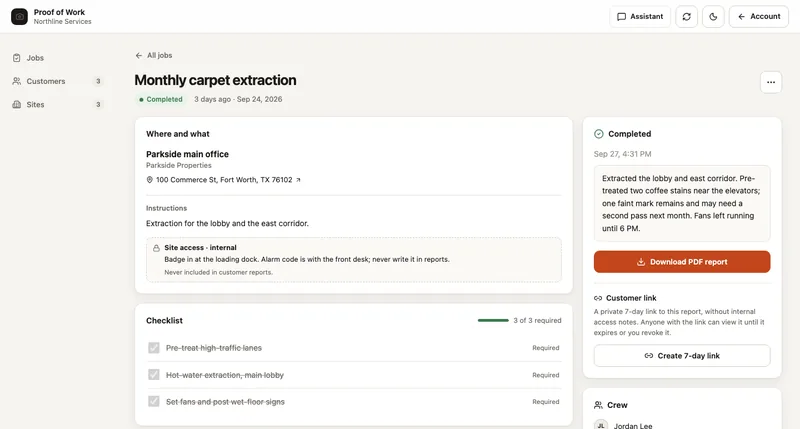
A pile of photos is difficult to review. A useful job report ties each image to the site, the work requested and the work completed. The customer should be able to follow the story without knowing how your crew names its files.
Use the downloadable checklist as a starting point for cleaning, property service, installation or maintenance jobs. Adapt it to the work you actually promise; it is a reporting aid, not an inspection standard.
Checklist
- Check the correct customer and site.
- Review every required checklist item.
- Make blocked or incomplete work visible.
- Remove unrelated private information from photos.
- Preview the customer report and set sharing access deliberately.
Capture the starting condition
Before work begins, identify the site and the area being worked on. Take a wide view for context, then a closer image when a defect or detail matters. Record an existing issue separately from the work you are about to perform.
Use the same angle for the after photo where practical. Avoid unrelated people, paperwork, access codes and other information the customer does not need in the report.
Connect photos to a short work checklist
Each required task needs an outcome: completed, incomplete with a reason, or not applicable where the job allows it. A photo can support that outcome, but should not silently replace the checklist. Give exceptions a next step and an owner.
- Site and job reference.
- Requested work and the crew assigned.
- Before photos with useful context.
- Completed checklist items and after photos.
- Exceptions, follow-up work and the completion time.
Example: a property clean with one blocked room
The crew photographs the entrance and the rooms included in the job, completes the accessible rooms and marks the locked room incomplete. The report says which area could not be accessed and what needs to happen next. A polished report should make this exception visible instead of implying the whole property was finished.
Keep entry instructions and internal staffing notes in the work record. Preview the actual customer report before sharing it, especially if photos show identifying information.
Share a report with a clear lifecycle
Decide who can share a report and when its link should expire. If a link is no longer appropriate, revoke it. Revocation stops future access through that link; it cannot recall a copy or PDF someone already downloaded.
SYSTALOG Proof of Work groups before-and-after photos with job checklists and produces customer reports and PDFs. Customer shares expire and can be revoked. The report documents what your team recorded; it is not independent verification or a substitute for a required certification.
Questions teams ask
How many photos should a job report contain?
Enough to explain the starting condition, completed work and any exceptions. Choose photos for a specific purpose rather than aiming for an arbitrary count.
Does revoking a report link delete a downloaded PDF?
No. Revocation prevents new access using the shared link. A recipient may still have a downloaded or copied report.