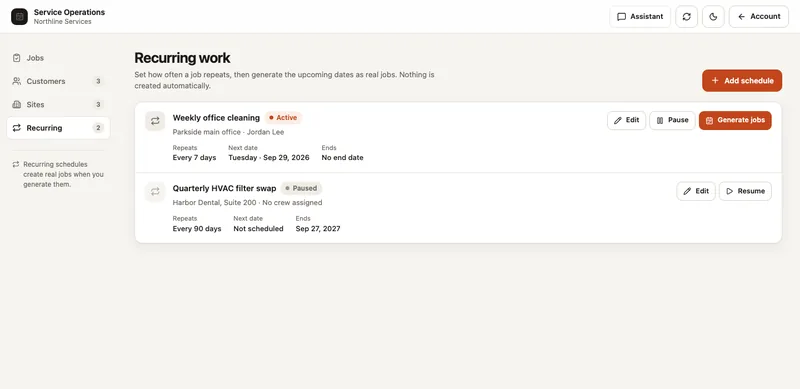
A recurring schedule says what should happen next. A job record says what actually happened. Keeping those separate prevents a postponed visit from looking completed and stops a changed schedule from rewriting past work.
Use the free CSV to define repeat service for each customer and site. It is a planning worksheet, not a route optimizer or a promise that a calendar invitation has been sent.
Checklist
- Separate schedules from visit history.
- Give each site/service combination its own schedule.
- Review dates after a pause.
- Check the generation preview.
- Record why a job was canceled or reopened.
Define one repeatable service per schedule
Record the customer, site, service description, repeat interval, next planned date and responsible crew. Attach the checklist that should be copied into each visit. If the same site has a weekly clean and a quarterly inspection, keep those as separate schedules.
Agree on what happens when a date falls on a holiday or access is unavailable. Do not assume that rescheduling a single visit changes every future date.
Review upcoming visits before generating jobs
Choose a bounded planning window, such as the coming workweek. Check the dates and count of visits before creating the jobs. Review staffing and access separately; a generated job is not proof that the customer has confirmed access.
- Verify the next scheduled date.
- Check the service and checklist version.
- Confirm a crew can take the work.
- Generate only the visits you intend to manage now.
- Keep each completed or canceled job as its own record.
Example: pausing service while a site is closed
A weekly service pauses during a building closure. When the site reopens, review the next date before resuming. Decide which missed visits are canceled and whether any catch-up work needs a separate job. Blindly creating every missed date can flood the queue with jobs that nobody intended to do.
Record a cancellation or reopening reason on the individual job. That gives staff a way to explain the change without guessing from the schedule’s current settings.
Choose software around the visit record
Look for a preview of the jobs that will be created, separate pause and resume controls, clear staff assignments and protection against duplicate generation. Test one changed date and one interrupted save before moving all your schedules.
SYSTALOG Service Operations combines recurring schedules with customers, sites, crews, checklists and job reports. Job generation uses a preview and avoids duplicate visits. Proof of Work handles individual jobs; recurring schedules belong to Service Operations. Neither product is a payroll or accounting system.
Questions teams ask
Should I create a year of jobs at once?
Use a planning window your team can review and manage. Generating too far ahead can create unnecessary cleanup when a contract, checklist or crew changes.
Does a service schedule reserve a customer appointment?
Not by itself. Confirm access and appointment arrangements through your agreed process; do not treat an internal work date as a customer booking confirmation.