
AI K9 training management system: your old paper forms, turned into records you can search

Bring existing working-dog forms into a reviewable workflow. K9Codex drafts training records from those documents and writes a short summary of each one. Handlers and supervisors check the source, correct errors, and decide what to save. AI assists the paperwork; it does not assess or certify your dog. Runs on iPhone, the web and Mac, for one handler or a whole unit.

  • $10 per seat a month
  • iPhone, web, Mac
  • Free download

The iPhone app is a free download. Workspace access needs a subscription or a team invitation: web seats are $10 per seat a month, and Apple shows in-app pricing before purchase. Set up a workspace on the web

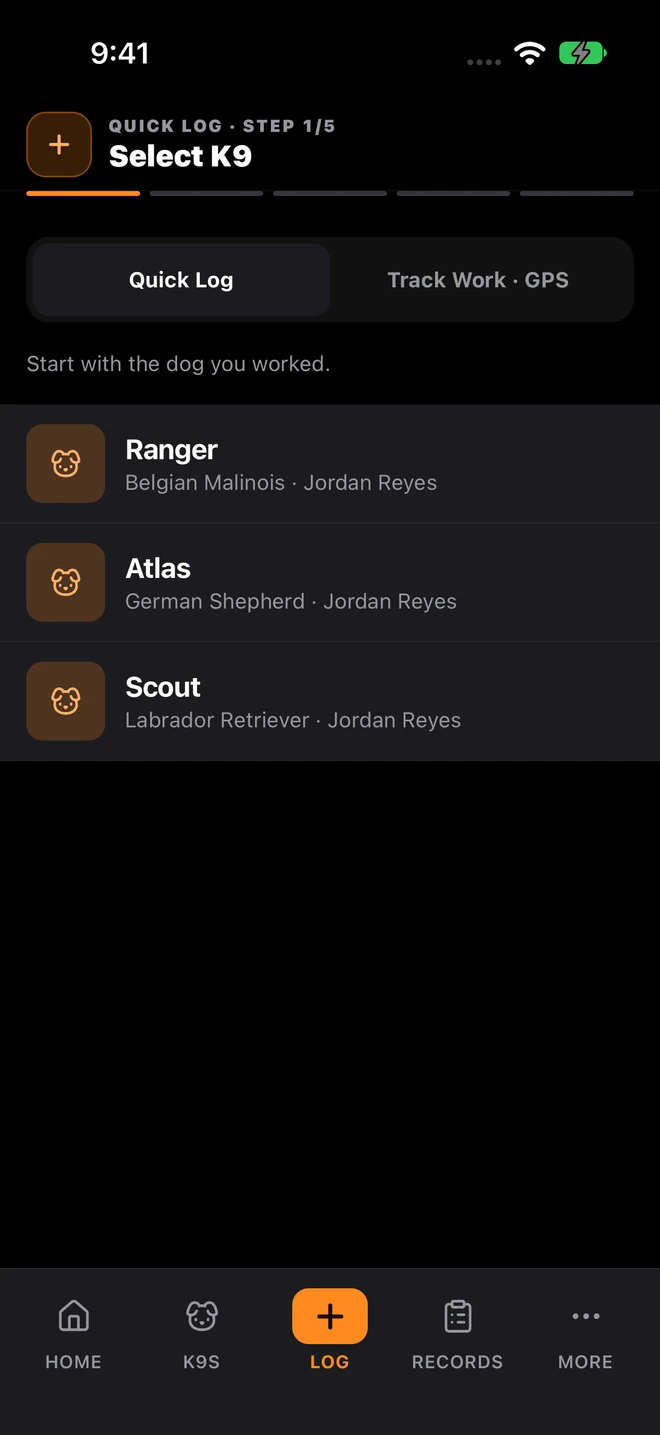
K9Codex iPhone Quick Log with sample data: select a K9 to begin a five-step training log

Who this is for

  • Police and sheriff K9 units digitizing legacy paper records
  • Private security canine programs standardizing multi-handler data
  • Search-and-rescue organizations importing years of training history
  • K9 academies running multi-handler teams with heavy documentation loads

Manual data entry from years of paper records takes weeks

Years of paper forms and spreadsheets take weeks to type in, and until they are in, nobody can search them.

The fix

K9Codex reads scanned training forms, spreadsheets, and photos and drafts one record per session: date, dog, handler, training type, result, duration, location, weather, and per-aide detection details. Each draft has a confidence score and warnings. A person reviews and corrects every draft before it is saved, and the saved record is marked as imported with a link to the original document.

How teams switch over

One step at a time, without stopping training.

  1. Agree on what every log includes

    Decide which fields every handler fills in: training type, outcome, weather, conditions, and notes. Consistent new logs make imported history easier to compare.

  2. Run daily logging

    Record scenario outcomes, locations, and notes as sessions occur. Use these source records when requesting a summary, and check the result before sharing it.

  3. Import historical records with AI

    Upload scanned forms or spreadsheets. AI extracts records, flags confidence, and lets supervisors review before committing.

  4. Review, then report

    Check imported entries and their summaries against the source, then export the Training Activity PDF or Training Logs CSV for the window you need.

What it looks like in the app

The K9Codex screens that handle this job.

How AI historical record import works

Upload scanned PDFs, spreadsheet files (CSV or XLSX), or photos of training log sheets. A language model, called through the SYSTALOG server so no key reaches your browser, reads each document at a low temperature (0.2) for consistent extraction. A single log sheet with many sessions is split into one draft record per session.

  • Supports scanned PDFs, spreadsheets, and photos of handwritten or typed forms
  • Extracts: date, dog, handler, training type, result, duration, location, weather, blind/double-blind status
  • Multi-aide extraction: plant time, detection time, weight, height, container, location, cert-eligible flag per aide
  • Confidence scores per extracted record with warnings for low-confidence fields
  • Records flagged as "imported" to distinguish from manual entries
  • Source document URL retained for full audit traceability

What you get

The parts your team will use every week.

A short summary on each imported record

Each imported session gets a two to four sentence summary of details the form fields do not hold, such as how the dog worked the hide. Read it against the original before you save.

Historical record import with AI parsing

Upload scanned training forms, spreadsheets, or photos and let AI extract structured records (date, dog, handler, type, result, duration, location, weather) with confidence scoring.

Multi-aide detection extraction

AI extracts per-aide data from documents where multiple odors were used in one session: plant time, detection time, weight, container, and cert-eligible status.

Vaccination report parsing

Upload a vet record or vaccination report on the web and K9Codex drafts the vaccination entries for that dog. Check each date before saving.

Paper and spreadsheets vs K9Codex

Same job, two ways.

TaskWithout dedicated softwareWith K9Codex
Import historical recordsTranscribe each field from the original documentsExtract a draft, compare it with the source, correct it, and save reviewed entries
Notes that do not fit a fieldLost when the form is retypedKept in a short summary on the imported record
Vaccination data entryTranscribe vet paperwork by hand into each dog profileUpload the vet document on the web, review the drafted entries, then save
Multi-aide session documentationOne row per session, aide details lost or inconsistentPer-aide data extracted: plant time, detection time, weight, container, cert flag
Data accuracy on importsManual transcription errors, inconsistent formattingConfidence scores and warnings point the reviewer to fields to check before saving

Questions we get

Still not sure? Ask for a walkthrough and we'll show you the live app with sample data.

Does the AI replace trainers or supervisors in decision-making?

No. The AI drafts records from documents and writes a short summary of each one. Trainers and supervisors check the drafts and decide what is saved. It does not assess a dog, a handler, or a certification.

How does the AI extraction run?

Documents are sent through a SYSTALOG server function to a large language model provider, with a low temperature setting (0.2) for consistent extraction. The provider key stays on the server and is never sent to the browser. Ask us for the current provider and its data terms during a security review.

Can AI extract training records from handwritten forms?

Often, yes. It reads photos of handwritten and typed log sheets and splits a multi-row sheet into one draft per session. Handwriting quality affects accuracy, so every draft shows a confidence score and warnings, and a person reviews it before it is saved.

Are imported records distinguishable from manually entered ones?

Yes. Imported records are marked as historical and keep a link to the source document, and the audit trail shows when they were created and by whom. That lets a reviewer tell a backfilled entry from one logged on the day.

Where does my data go when I use AI import?

Only the document you choose to import is sent, through the SYSTALOG server, to the AI provider for extraction. Your saved records stay in your organization workspace, separated from other organizations. If you do not use AI import, nothing is sent. See the K9Codex security page, and ask for the provider terms before uploading sensitive records.

Do I have to use AI features or can I use the platform without them?

AI import is optional. Training logs, dog profiles, certifications, GPS tracks, reports, and the audit trail all work without it. Most teams use it once, to bring in older paper or spreadsheet records.

K9Codex

Try it on the work your team does every week

One dog, one session, one report. If the fields and the export fit how you work, bring the team in.

© 2026 Systems Logic & Automation Group LLC

Studio prices are examples; every custom project gets a flat quote first. K9Codex supports recordkeeping and does not replace an audit. GemFit.ai is not a medical device.