
K9 activity tracking system: every session, track and certification in one place

See what each dog and handler has done: every training session with its type, result, location, weather, and GPS track, plus certification dates and status changes. Search by dog, handler, or date and export the result for review. Runs on iPhone, the web and Mac, for one handler or a whole unit.

  • $10 per seat a month
  • iPhone, web, Mac
  • Free download

The iPhone app is a free download. Workspace access needs a subscription or a team invitation: web seats are $10 per seat a month, and Apple shows in-app pricing before purchase. Set up a workspace on the web

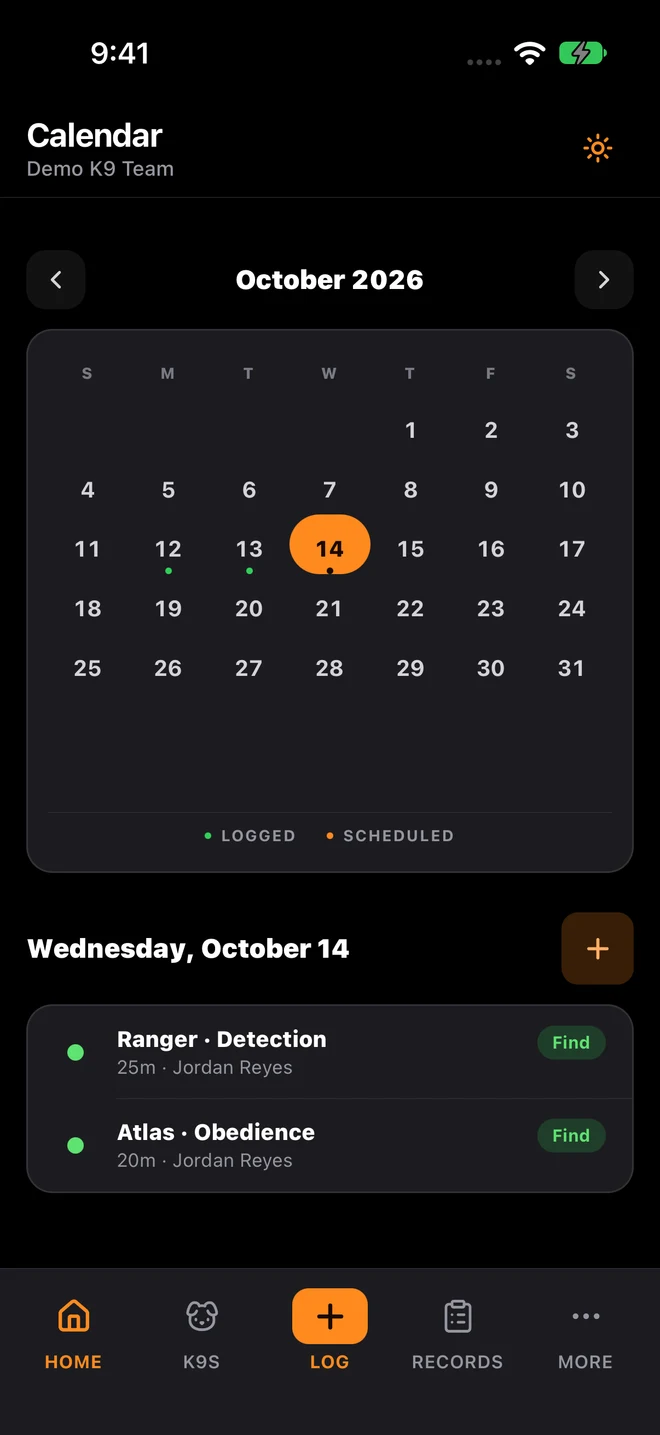
K9Codex iPhone calendar with sample data: October training dates and the selected day’s sessions

Who this is for

  • Unit leaders checking training activity and readiness across several dogs and handlers
  • Handlers logging field and training activity in real time
  • Compliance admins assembling agency records for inspections and audits
  • Teams replacing fragmented logs and shared folders with one system

Your activity history is spread across three spreadsheets and a group text

Answering "how many sessions did Duke have this month?" should not mean three spreadsheets, a shared folder and a text thread.

The fix

K9Codex keeps training sessions, GPS tracks, certification records, and status changes in one workspace, each with the handler and a timestamp. A supervisor filters by dog, handler, or date range and has the answer on one screen. K9Codex does not have a separate deployment or callout record type today; teams that need one should ask us before relying on it.

How teams switch over

One step at a time, without stopping training.

  1. Add dogs and handlers

    Create a profile for each dog, assign handlers, and enter current certifications so new activity lands on the right record.

  2. Log in real time

    Log sessions on iPhone at the training site instead of backfilling later. Record a GPS track if it helps, and fill weather from your location.

  3. Check the dashboard weekly

    Look at recent sessions, upcoming certification expirations, and dogs that are behind on training.

  4. Export for review

    Pick the dogs and date range, generate the report, and compare it with the source records before it goes to leadership or an auditor.

What it looks like in the app

The K9Codex screens that handle this job.

GPS-linked activity records

When a handler records a GPS track during a field session, the route, distance, duration, article pins, and photos are saved with that training log. Weather can be filled from the track location. During a debrief, the trainer opens the session and sees the map with the notes.

  • GPS route saved inside the training log
  • Weather filled from the location where the track started
  • Photos attached to article pins on the map
  • Layer and follower tracks shown on one map for review
  • Distance and duration calculated from the track

What you get

The parts your team will use every week.

Activity history per dog

Training sessions, GPS tracks, certifications, and status changes for each dog, with the handler and date on every entry.

Handler-attributed entries

Every activity entry is tied to the responsible handler or admin user, creating a clear accountability chain for supervisors.

Filterable operational history

Filter by dog, handler, date range, training type, or outcome instead of searching several spreadsheets.

Export for command review

Export a Training Activity PDF or Training Logs CSV for the dogs and dates you choose, built from the same records the team logged.

Paper and spreadsheets vs K9Codex

Same job, two ways.

TaskWithout dedicated softwareWith K9Codex
Find a specific sessionSearch several spreadsheets and folders by handFilter by dog, handler, date, or type on one screen
Certification historyA separate spreadsheet or calendarCertifications and expiry dates on the same dog profile as training
Audit preparationCompile records from several sources over daysExport a report for the dogs and dates under review
GPS field contextNot available in text-based logsRoute maps, coordinates, and photos embedded in activity records

Questions we get

Still not sure? Ask for a walkthrough and we'll show you the live app with sample data.

Does K9Codex track deployments as well as training?

Not as a separate record type today. K9Codex is built around training sessions, GPS tracks, certifications, and the change history on each record. Some teams log field work as a session with notes, but if your agency needs a formal deployment or use record, talk to us before relying on K9Codex for it.

How is GPS data connected to activity records?

When a handler records a GPS track during a session, the route, distance, duration, weather, and any photo pins are saved with that training log. Opening the session shows the map and the notes together.

Can multiple handlers log activity simultaneously?

Yes. Each handler signs in with their own account and logs their own sessions, so nobody overwrites another person's entry the way a shared spreadsheet can. Supervisors see every handler's activity.

What happens to activity data when a dog changes status or retires?

Changing a dog to Retired or another status does not delete its training sessions or certifications; they stay searchable and exportable. The status change itself appears in the audit trail with who made it and when.

Can I export activity records for external audits?

Yes. On iPhone you can create a Training Activity PDF, a Certification Status PDF, or a Training Logs CSV, and the web workspace has certification, performance, GPS track, and CSV exports. Check a generated file with your reviewer before replacing an existing report.

Can older activity be added?

Yes. Sessions can be entered with their original dates, and older paper or spreadsheet records can be brought in with AI-assisted import. Imported records keep their original dates and are marked as historical. Your organization decides how long records are kept.

K9Codex

Try it on the work your team does every week

One dog, one session, one report. If the fields and the export fit how you work, bring the team in.

© 2026 Systems Logic & Automation Group LLC

Studio prices are examples; every custom project gets a flat quote first. K9Codex supports recordkeeping and does not replace an audit. GemFit.ai is not a medical device.