
K9 handler training software that tracks each handler, session by session

Follow each handler's progress session by session: what was run, the result, the handler's own notes, and the trainer's feedback. Supervisors review and sign off, and the training log export can be filtered by handler for any date range. Runs on iPhone, the web and Mac, for one handler or a whole unit.

  • $10 per seat a month
  • iPhone, web, Mac
  • Free download

The iPhone app is a free download. Workspace access needs a subscription or a team invitation: web seats are $10 per seat a month, and Apple shows in-app pricing before purchase. Set up a workspace on the web

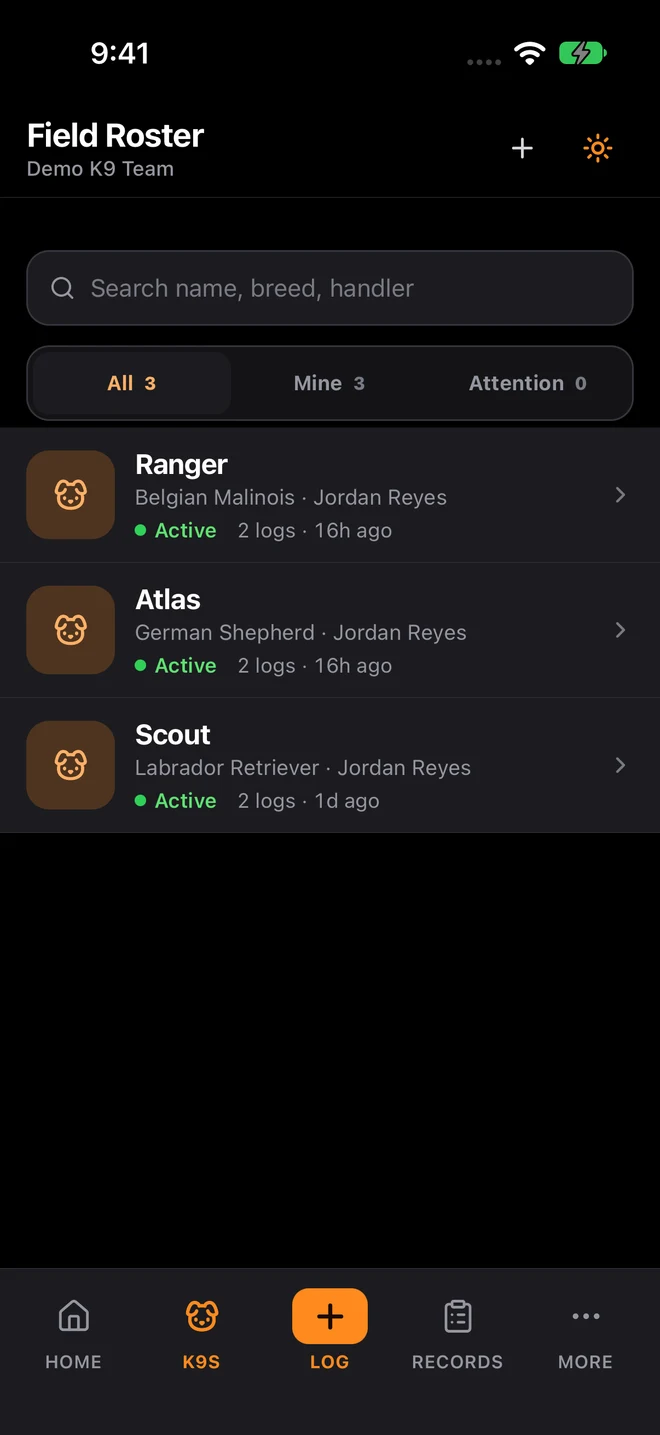
K9Codex iPhone Field Roster with sample data: three dogs, handler names, activity and log counts

Who this is for

  • Lead trainers managing handler development across multiple dog-handler teams
  • K9 academies tracking student handler progression through training programs
  • Security teams standardizing coaching quality and performance evaluation
  • Units that need clear, documented performance feedback loops for handlers

Handler progress lives in the trainer's head

When that trainer transfers or retires, everything they knew about each handler leaves with them.

The fix

K9Codex keeps a searchable record of every handler's sessions, outcomes, and trainer feedback, with GPS tracks where recorded. Reports show training volume and results by handler over time, so a supervisor judges readiness from the record instead of memory.

How teams switch over

One step at a time, without stopping training.

  1. Write down your standards

    Agree on the training types, frequency, and results you expect from each handler, using your program's own standards.

  2. Log scenario outcomes

    Record what was run, what passed, what needs corrective work, and attach trainer observations to each training event.

  3. Review results weekly

    Use the performance report and filtered exports to spot recurring misses and handlers who need more coaching time.

  4. Share progress

    Export reports for command, academy leadership, or program administrators, and keep the signed session records behind them.

What it looks like in the app

The K9Codex screens that handle this job.

Structured coaching and feedback workflows

The sign-off chain doubles as a coaching loop. The handler logs the session and their own notes. The trainer reviews it, adds feedback and what to work on next, and stamps it. The supervisor signs off. Each step is timestamped, so the history supports performance reviews.

  • Handler logs the session with their own notes
  • Trainer reviews, adds feedback and follow-up work, and stamps the record
  • Supervisor signs off and the record locks
  • Performance report and handler-filtered exports show results over time
  • GPS tracks show how a tracking or search exercise was run
  • Trainer feedback is searchable and tied to the session

What you get

The parts your team will use every week.

Handler progression timelines

See each handler's sessions in date order, by dog and training type, alongside their dog's certification dates.

Session-level coaching notes

Trainers add observations and the next thing to work on to each session, kept separate from the handler's own notes and searchable later.

Role-based review workflows

Separate handler input, trainer review and feedback, and supervisor sign-off with clear accountability at each stage.

Results by dog and handler

The performance report shows finds, misses, and success rates by odor, hide height, and container for each dog, and the log export filters by handler before a coaching conversation.

Paper and spreadsheets vs K9Codex

Same job, two ways.

TaskWithout dedicated softwareWith K9Codex
Handler progressionTrainer's memory and informal notesSession history with results and trainer feedback
Coaching feedbackVerbal feedback with no written recordFeedback written on the session and searchable later
Finding weak areasRelies on the trainer rememberingThe performance report shows where misses repeat by odor, height, and container
Performance reviewsImpressions from memorySession volume, results, and certification status from the record

Questions we get

Still not sure? Ask for a walkthrough and we'll show you the live app with sample data.

Is this about handler development as well as dog records?

Yes. K9Codex also keeps dog profiles and certifications, but this page is about the handler: their sessions, outcomes, trainer feedback, and progress over time.

Can trainers add specific coaching notes to sessions?

Yes. Handlers write their own notes on each session and trainers add their feedback separately, so it is clear who said what. Both are searchable and tied to the session, dog, and date.

How are handler performance trends tracked?

The performance report shows finds, misses, and success rates for each dog by odor, hide height, and container, and the training log export can be filtered by handler and date range. Use them to see whether a weak area is improving.

Can supervisors compare handler performance across the team?

Yes, by exporting the training logs for the same period and filtering by handler. There is not yet a single side-by-side handler comparison screen.

Does it support academy-style progression tracking?

Partly. K9Codex records every session, result, and trainer note, and reports show progress by training type. It does not have configurable academy phases or competency checklists today; academies usually track those stages in their own curriculum and use K9Codex for the session record.

What happens to handler records when they transfer between units?

A handler's past sessions stay in the organization's records when assignments change, and reassigning a dog does not erase its history. Assignment changes appear in the audit trail with the time and the person who made them.

K9Codex

Try it on the work your team does every week

One dog, one session, one report. If the fields and the export fit how you work, bring the team in.

© 2026 Systems Logic & Automation Group LLC

Studio prices are examples; every custom project gets a flat quote first. K9Codex supports recordkeeping and does not replace an audit. GemFit.ai is not a medical device.