
K9 training records software: every session searchable, with a name on it

Keep every K9 training session in one searchable place, by dog, handler, training type, and date, so you can answer a readiness question without digging through binders. Each record shows who logged it and when, and includes the GPS track when one was recorded. Runs on iPhone, the web and Mac, for one handler or a whole unit.

  • $10 per seat a month
  • iPhone, web, Mac
  • Free download

The iPhone app is a free download. Workspace access needs a subscription or a team invitation: web seats are $10 per seat a month, and Apple shows in-app pricing before purchase. Set up a workspace on the web

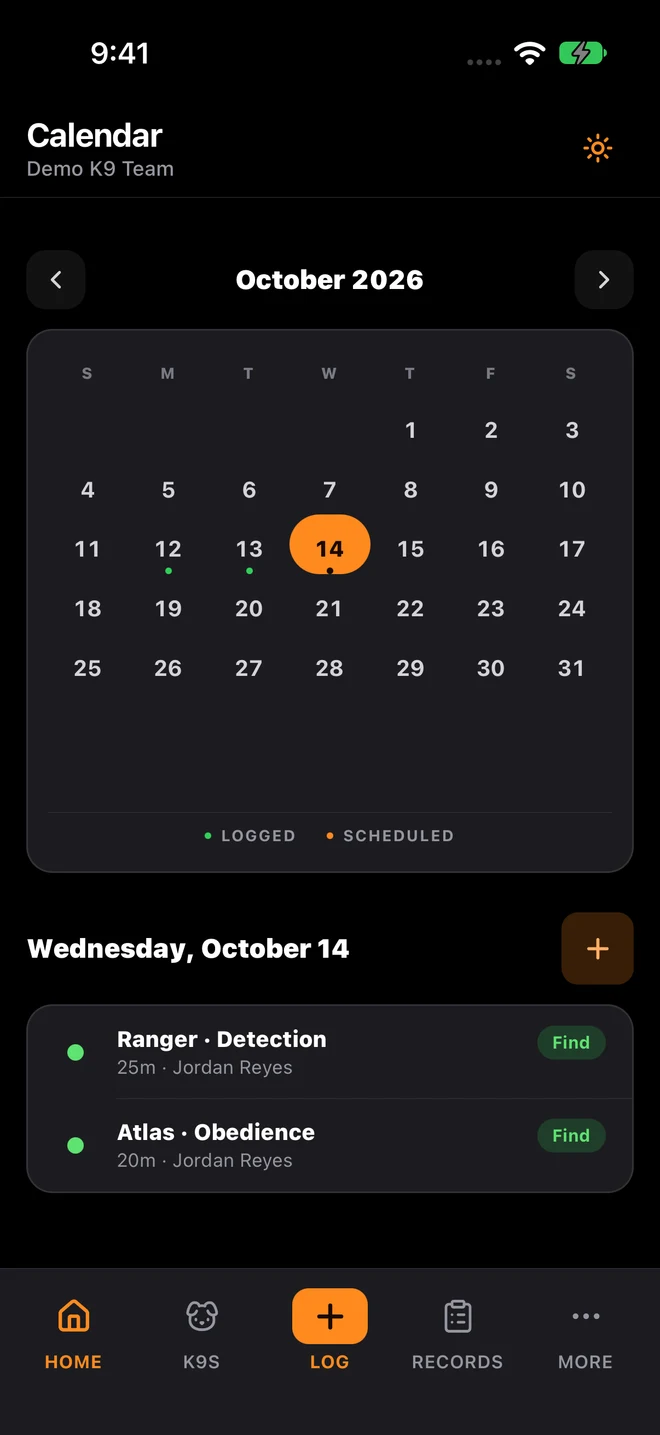
K9Codex iPhone calendar with sample data: October training dates and the selected day’s sessions

Who this is for

  • K9 supervisors managing training quality across multiple dog-handler teams
  • Operations leaders reviewing unit readiness and training cadence
  • Training coordinators standardizing data capture across an organization
  • Agencies replacing paper logs, handwritten notebooks, or spreadsheet archives

The gaps in your records show up during an audit, the worst possible time

Backfilling missing or unsigned sessions after a review starts makes the whole file look worse.

The fix

K9Codex guides every handler through the same fields, stamps each record with the handler and time, and lets any authorized team member search the records. A backdated entry still shows when it was really entered, and supervisors can sign off and lock records as they review them.

How teams switch over

One step at a time, without stopping training.

  1. Import baseline data

    Add your dogs and handlers, then bring in older training records with AI-assisted import from scanned forms and spreadsheets, reviewed before saving.

  2. Define record requirements

    Agree which fields every handler fills in and what a complete log looks like for your unit.

  3. Log daily training activity

    Capture structured outcomes as sessions happen: training type, result, duration, weather, GPS route, photos, and notes.

  4. Run monthly record audits

    Check for incomplete or unsigned logs and dogs behind on training, and fix documentation issues before a compliance review.

What it looks like in the app

The K9Codex screens that handle this job.

Rich training record structure

A K9Codex training record holds more than a spreadsheet row: training type, outcome, duration, weather, temperature, GPS route when recorded, photos, handler notes, trainer notes, and per-aide detection details, all tied to the dog, the handler, and the session time.

  • Training types: detection, tracking, obedience, controlled aggression, article search, building search, vehicle search, area search, certification testing, and other
  • Outcomes: find, met standard, miss, false alert, needs improvement, and other
  • Location categories and weather conditions from pick lists for field context
  • GPS route with distance, duration, and article pins
  • Photos attached to pins during tracked sessions
  • Per-aide details: plant time, detection time, weight, container, and whether it counts toward certification

What you get

The parts your team will use every week.

Single record system

Store training entries in one workspace instead of split files, shared folders, and handwritten notebooks.

Fast filtering and lookup

Find a record by handler, dog, date range, training type, or outcome without scrolling through spreadsheets.

The same fields on every log

Every handler fills in the same guided fields and pick lists, which cuts down on incomplete or inconsistent logs.

Report exports

Export training activity and certification reports, or a CSV of training logs, for leadership reviews, accreditation audits, and agency reporting.

Paper and spreadsheets vs K9Codex

Same job, two ways.

TaskWithout dedicated softwareWith K9Codex
Find a specific sessionScroll through spreadsheets or search paper filesFilter by dog, handler, date, type, or outcome
Record completenessGaps discovered during auditsGuided fields at entry and supervisor review before sign-off
Field evidenceGPS and photos captured separately or not at allGPS route and photos embedded in the training record
Record attributionUnknown who created or edited the recordHandler signature, timestamp, and edit history on every entry

Questions we get

Still not sure? Ask for a walkthrough and we'll show you the live app with sample data.

Can the system handle records from multiple training types?

Yes. K9Codex logs detection, tracking, obedience, controlled aggression, article, building, vehicle, and area searches, certification testing, and an Other type you can name. Detection sessions with several aids record each aid's plant time, detection time, weight, container, and whether it counts toward certification.

Can I search training records by specific criteria?

Yes. Search and filter by dog, handler, date range, training type, outcome, and location. Each result opens the full session, including the GPS track when one was recorded.

What happens when a handler forgets to log a session?

Handlers can backdate entries, but the creation timestamp in the audit trail shows when the record was entered into the system, not the session date. This distinction is important for audit purposes because it shows the record was entered after the fact.

Are GPS records linked to training logs?

Yes. When a handler records a GPS track during a session, the route, distance, duration, weather, article pins, and photos are saved in that training record. Opening the log shows the track.

Can multiple handlers log sessions simultaneously?

Yes. Each handler signs in to their own account and logs their own sessions, so entries do not overwrite each other. Supervisors see every handler's records.

Can historical records be imported into the system?

Yes. AI-assisted import drafts records from scanned training forms, spreadsheets, and photos, and a person reviews each draft before saving. Imported records keep their original dates, are marked as historical, and link to the source document. How long it takes depends on how many records you have and how readable they are.

K9Codex

Try it on the work your team does every week

One dog, one session, one report. If the fields and the export fit how you work, bring the team in.

© 2026 Systems Logic & Automation Group LLC

Studio prices are examples; every custom project gets a flat quote first. K9Codex supports recordkeeping and does not replace an audit. GemFit.ai is not a medical device.