K9 training software vs spreadsheets: where the spreadsheet starts breaking

A spreadsheet can work for one handler with a few dogs. Once several handlers share it, entries get overwritten, nobody can see who changed what, and reports take hours. Here is how K9 training software and spreadsheets compare on the work a unit does every week. Runs on iPhone, the web and Mac, for one handler or a whole unit.

  • $10 per seat a month
  • iPhone, web, Mac
  • Free download

The iPhone app is a free download. Workspace access needs a subscription or a team invitation: web seats are $10 per seat a month, and Apple shows in-app pricing before purchase. Set up a workspace on the web

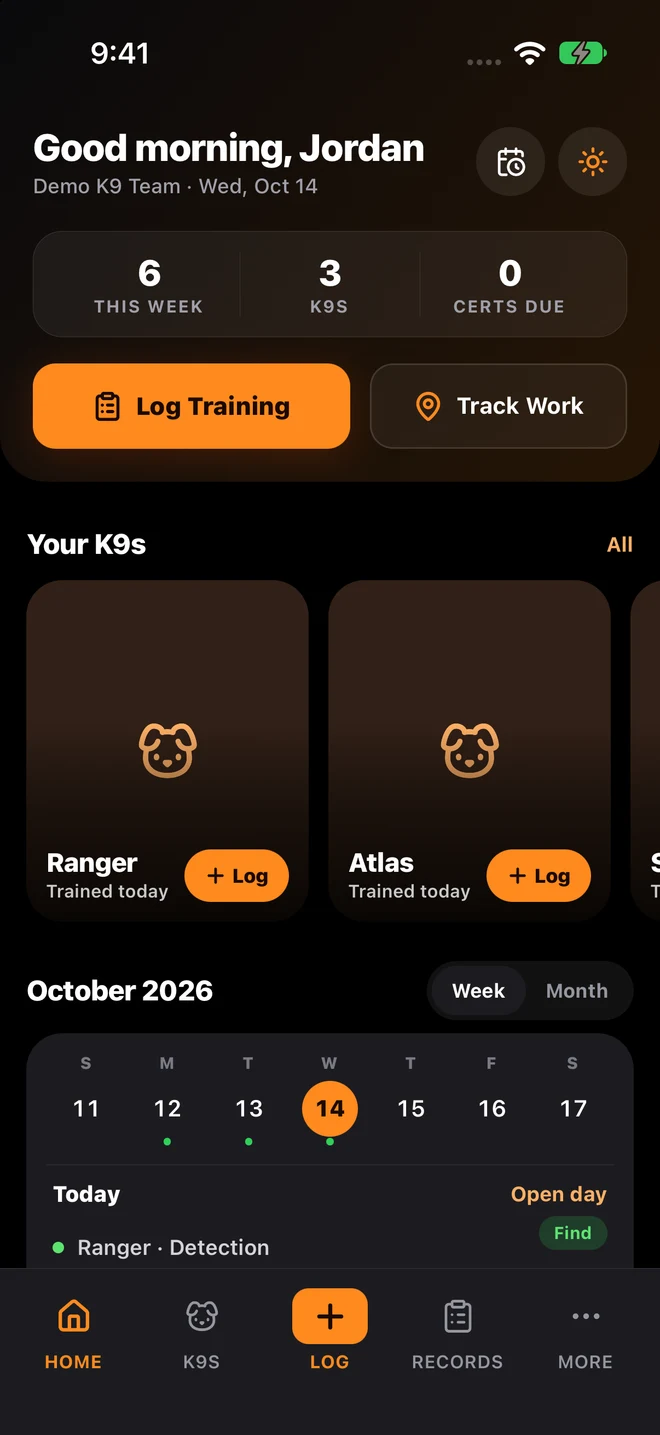
K9Codex iPhone Home with sample data: weekly training totals, Log Training, Track Work, three K9s and the training calendar

Who this is for

  • Units evaluating whether to move off spreadsheets to dedicated K9 software
  • Leaders reviewing record-quality risk from continued spreadsheet reliance
  • Teams with recurring audit pressure or accreditation requirements
  • Programs scaling handler count and training volume beyond spreadsheet capacity

Once several handlers share a spreadsheet, nobody can tell who changed what

When an auditor asks who changed a cell and when, a shared spreadsheet has no answer.

The fix

In K9Codex each handler signs in and enters their own records, with access set by role. The audit trail keeps every change with the user, the time, and the before and after values. Reports come from the same records. GPS tracks, certification dates, and reviewed AI import sit in the same place, which a spreadsheet cannot do.

How teams switch over

One step at a time, without stopping training.

  1. Audit your current process

    Identify where spreadsheet workflows create inconsistency, delay, or risk: version conflicts, missing entries, unverifiable edits.

  2. Map required controls

    Define non-negotiable needs for data history, certification tracking, reporting quality, and access control.

  3. Pilot one team in software

    Run a focused migration with one team or unit before expanding across all handlers.

  4. Standardize across the organization

    Apply a consistent operating model with the same fields, workflows, and reporting formats across all teams.

What it looks like in the app

The K9Codex screens that handle this job.

What specifically breaks when K9 teams outgrow spreadsheets

The trouble usually starts when more than one person edits the file or when the data covers more than a few months. Then the same problems show up: overwritten entries, no edit history, certifications in a separate file, GPS data in another app, and reports that take hours to build.

  • Version conflicts: two handlers editing at once can lose data
  • No audit trail: who changed what and when is unknowable after the fact
  • Certification tracking: requires a separate spreadsheet or manual calendar
  • GPS data: cannot be embedded in a spreadsheet row; it lives in a separate app
  • Report formatting: manual assembly every month with inconsistent output
  • Role access: everyone can edit everything; no handler/trainer/admin separation
  • Search: ctrl+f through rows vs structured filtering by any field
  • Old records: everything has to be retyped by hand

What you get

The parts your team will use every week.

Guided entry instead of free-form cells

Every handler fills in the same fields and pick lists, so records look the same and reports do not need cleanup.

Built-in change history

Track who changed what and when with before/after values. Spreadsheets cannot reliably reconstruct edit history after the fact.

Consolidated reporting

Generate reports from the records already entered. Spreadsheets need manual assembly and formatting every cycle.

Role and access boundaries

Separate handler entry, trainer review, and admin oversight. Shared spreadsheets blur edit permissions and lack accountability.

Paper and spreadsheets vs K9Codex

Same job, two ways.

TaskWithout dedicated softwareWith K9Codex
Data entryFree-form cells, no validation, inconsistent formattingGuided forms with pick lists for type, location, weather, and outcome
Multi-handler accessShared file means overwrites and lost entriesEach handler logs in their own account
Edit historyNo reliable record of who changed what or whenFull audit trail with user, timestamp, before/after values
Certification trackingSeparate spreadsheet, manually updated, no alertsCertifications on each dog with expiry dates on the dashboard
GPS field dataNot possible; lives in a separate GPS app or is not capturedRoute, distance, photos, and article pins embedded in session
Older recordsRetype hundreds of records by handAI drafts records from scans; a person reviews each before saving
Monthly compliance reportAssembled by hand from several sourcesGenerated from the logged records
Role-based accessEveryone can edit everythingHandler, Trainer, Supervisor, Admin with scoped permissions
Search and filterCtrl+f through rows or manual scrollFilter by dog, handler, date, type, outcome, cert status
Record accountabilityUnknown who entered or edited a recordEvery entry attributed with handler identity and timestamp
Field accessTyped up at a desk lateriPhone app at the training site, plus web and Mac
Monthly cost (10 handlers)Free to open, but supervisor hours go into formatting and reconciling$100/month at $10 per seat, and those hours go back to training

Questions we get

Still not sure? Ask for a walkthrough and we'll show you the live app with sample data.

Are spreadsheets always wrong for K9 programs?

No. One handler or a very small team with a few dogs can manage with a spreadsheet for a while. Problems start when several people edit the same file, when you need to show who changed a record, or when reports take longer than the training they describe.

What does K9 software do that spreadsheets cannot?

Five things: keep an edit history with before and after values, save GPS tracks and photos inside the training record, import old scanned records with a review step, limit what each role can edit, and produce the same reports each cycle from the records already entered.

How long does it take to switch from spreadsheets to K9 software?

New sessions can go into K9Codex as soon as your dogs and handlers are set up. Older spreadsheet rows can be brought in with AI-assisted import, which drafts records for a person to review. How long that takes depends on how much history you bring over.

Will my team resist switching from spreadsheets?

Some may, at first. The logging screen asks for the same details they already write down, and nobody can overwrite their entries. Start with one team for a month, then bring the rest of the unit over.

Can I try the software before committing my whole team?

Yes. The iPhone app is a free download, and a single handler can start a private workspace before you add seats for the team. Workspace access needs a subscription; Apple shows pricing and any eligible trial before purchase. You can also ask for a walkthrough with sample data.

How do the costs compare?

A spreadsheet is free to open, but someone pays in hours: building reports, fixing overwritten entries, and getting ready for audits. Count those hours for your own unit. K9Codex is $10 per seat a month, so 10 handlers cost $100 a month.

K9Codex

Try it on the work your team does every week

One dog, one session, one report. If the fields and the export fit how you work, bring the team in.

© 2026 Systems Logic & Automation Group LLC

Studio prices are examples; every custom project gets a flat quote first. K9Codex supports recordkeeping and does not replace an audit. GemFit.ai is not a medical device.